
Want proof that our indexing service actually works? You can verify it yourself in under five minutes using a free tool called Request Catcher.
This method lets you see exactly when Googlebot visits a URL you submit, with full request headers and timestamps.
What is Request Catcher?
Request Catcher is a free debugging tool that creates temporary subdomains to capture incoming HTTP requests. Any request sent to your subdomain gets logged in real time, showing you the source, headers, and timing.
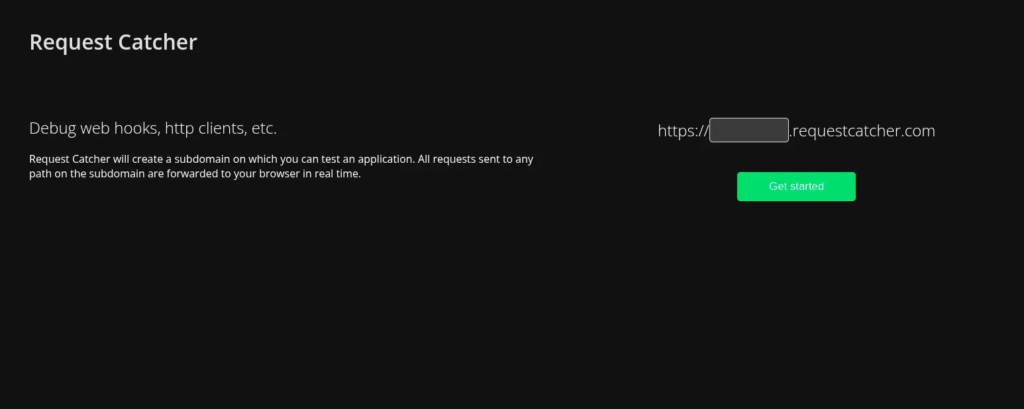
Request Catcher creates temporary subdomains that log all incoming requests
For our purposes, it is a simple way to prove that submitting a URL through our service results in Googlebot actually crawling that URL.
How to Test It Yourself
Step 1: Create a Request Catcher Subdomain
Go to requestcatcher.com and enter a unique subdomain name. Something like indextest1 or mycompany-test-jan2026 works fine.
Click “Get started” and you will have a live endpoint at https://yourname.requestcatcher.com/ that logs every incoming request.
Step 2: Submit the URL to Our Indexer
Take your Request Catcher URL and submit it through Rapid Indexer
Step 3: Watch for Googlebot
Keep the Request Catcher page open. Within minutes, you should see requests appear from Googlebot.
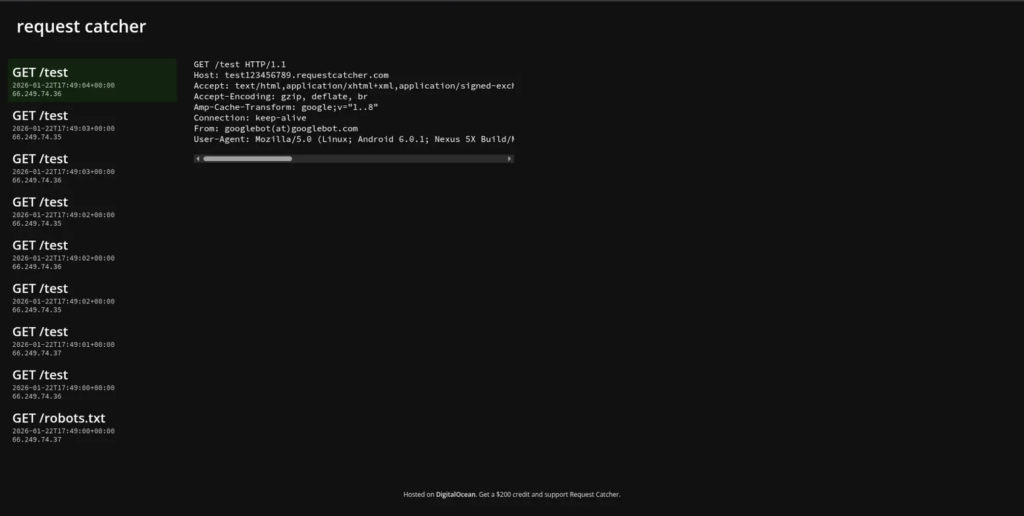
What You Will See
When Googlebot visits your URL, Request Catcher logs the full request details:
- Request path:
GET /test - Timestamp: Exact time of the crawl
- IP address: Google’s crawler IPs (66.249.74.x range)
- User-Agent:
Mozilla/5.0 (Linux; Android 6.0.1; Nexus 5X Build/...identifying Googlebot - From header:
googlebot(at)googlebot.com
The From: googlebot(at)googlebot.com header and the 66.249.x.x IP range confirm these are legitimate Googlebot requests, not spoofed traffic.
Why This Matters
This test proves several things:
- Our service triggers real crawls. Googlebot actually visits the URLs you submit.
- Crawls happen fast. In our tests, Googlebot arrived within minutes of submission.
- Multiple crawl attempts. Google often sends several requests in quick succession, as shown by the repeated
GET /testentries.
Try It Yourself
You do not need to take our word for it. Set up your own Request Catcher endpoint, submit it through our service, and watch the results in real time.
This is the most transparent way to verify that URL submissions lead to actual Googlebot activity.
A Note on Indexing vs. Crawling
This test proves crawling, not indexing. Googlebot visiting a URL is the first step. Whether Google ultimately adds the page to its index depends on content quality, site authority, and other ranking factors.
But if Googlebot never visits, indexing cannot happen. This test confirms the critical first step is working.
Even after a successful crawl, verifying indexing has become unreliable. Google no longer exposes a complete view of its index through public tools. Pages can rank and receive traffic while appearing “not indexed” through traditional checks. Read our full explanation of why index checking is broken in 2026.
Bonus: Test with Google’s Rich Results Tool
You can also trigger a Googlebot crawl yourself using Google’s own Rich Results Test at search.google.com/test/rich-results.
Enter your Request Catcher URL and run the test. You will see a different Googlebot appear in your logs, this time from Google’s testing infrastructure rather than their main crawler.
This is a useful way to compare what our service triggers versus what Google’s public tools trigger. Both result in real Googlebot requests, but from different parts of Google’s systems. The key difference: the Rich Results Test crawler will not lead to indexing. It is purely for testing. Our service triggers the actual indexing crawler.
Ready to test it? Submit your first URL and see the results for yourself.
Our Guarantee
While we cannot guarantee indexing (that is ultimately Google’s decision based on content quality and site authority), we can guarantee a crawl. If you submit a URL through our service, Googlebot will visit it.
If you do not believe us, PM us and we will add enough credits to your account to run this test for free.