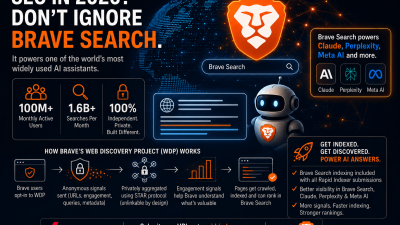
Most SEO advice is about Google. But when someone asks Claude a question and it goes to the web for an answer, it isn’t searching Google. It’s searching Brave.
This guide explains, in plain terms, how Brave Search decides which pages get into its index, what it measures when real people visit your site, why most pages never make it in, and how Rapid Indexer’s Brave indexing solves that. Everything here comes from Brave’s own open-source browser code, so it describes what actually happens rather than what people guess happens.
Why Brave Search matters for AI visibility
Brave Search is one of the only fully independent search engines in the West. It doesn’t buy results from Google or Bing; it has its own index built from its own crawler and its own browser users. It handles around 1.6 billion searches a month.
On its own, that would make Brave a useful secondary channel. What makes it essential is who reads from its index:
- Claude uses Brave Search for web results. Brave is named in Anthropic’s subprocessor list, the Claude web search tool has a
BraveSearchParamssetting, and Google’s Vertex AI documentation for Claude names Brave as the search provider. Independent testing by Profound found an 86.7% overlap between the sources Claude cites and Brave’s top organic results. - Brave’s search API is also licensed to other AI products, and Brave has been reported as a data source for Perplexity and Meta AI.
We’ve tested this ourselves. For a client brand, the page Claude cited was ranking in Brave but wasn’t in Google’s index yet at all. Pages that ranked in Bing for the same brand were ignored.
The practical conclusion: if your page isn’t in Brave’s index, it can’t be cited by Claude. If it is in Brave and Brave’s data says people find it useful, your chances of being the cited source go up sharply.
How Brave builds its index
Brave uses two systems, and understanding the difference is the key to everything else.
1. BraveBot – the crawler
BraveBot is a normal web crawler, like Googlebot. It follows links, downloads pages and stores the text. It’s how Brave knows what your page says.
2. The Web Discovery Project – real user signals
The Web Discovery Project (WDP) is what makes Brave different. It’s an optional feature inside the Brave browser. When a user turns it on, their browser quietly reports two things back to Brave, anonymously:
- Which pages real people visit. This tells Brave that a URL exists and is worth crawling.
- What people do on those pages. How long they actively read, whether they scroll, whether they copy text, and which search they came from.
Brave describes this as a “collaborative effort of Brave users” to work out “the quality and relevance” of pages. In other words, WDP is both Brave’s discovery system and its quality signal. A crawler can read your page; only WDP can tell Brave whether humans found it useful.
The whole system is open source on GitHub, which is how we know exactly what it measures.
What Brave measures when someone visits your page
When a Brave user with WDP enabled lands on your page, the browser builds a small report. Here is what’s in it, in plain terms.
Engagement
| What Brave records | What it actually means |
|---|---|
| Active time | Seconds where the user did something (moved the mouse, scrolled, typed, clicked) in the last 5 seconds. Time spent with the tab open in the background doesn’t count. Capped at 100 seconds. |
| Total time | How long the page was open, start to finish. |
| Scroll | How many separate seconds the user scrolled in. Counts at most once per second, so it measures reading, not fidgeting. |
| Mouse movement | Separate seconds with mouse movement. |
| Clicks | Separate seconds with a click. |
| Copy | Separate seconds where the user copied text. Rare, high-intent, capped at 10. |
| Typing | Separate seconds with keypresses. |
One important rule: none of the scroll, click, copy or mouse signals start counting until the page already has more than 4 seconds of active time. Someone who lands and bounces instantly produces a near-empty report. Brave is designed to only count genuine engagement.
The search that brought them
If the user arrived from a search results page, Brave records the exact query they searched for alongside the page they landed on and how they engaged with it. This is the most valuable signal in the system: “someone searched X, landed on this page, and read it for a minute.”
That query also follows the user one click deeper, as long as they stay on your domain. So if a visitor lands on your guide from Brave Search and then clicks through to your pricing page, the pricing page picks up the search query too.
The shape of the page
Brave also records the page’s structure: its title, how much HTML and text it contains, how many links, forms and input fields it has, whether it has a canonical URL, its language, and whether it’s marked noindex. Brave never collects the actual text of your page through WDP; that comes from BraveBot.
What Brave deliberately does not collect
No user IDs, no cookies, no full IP addresses, no page content, and no record of which internal links were clicked. The whole system is built so that Brave cannot tell which reports came from the same person.
The 20-visitor rule: why most pages never get in
This is the single most important thing to understand about Brave.
Every WDP report is encrypted before it leaves the browser, and Brave’s servers cannot decrypt a report for a URL until at least 20 different people, on 20 different networks, have visited that same URL. Until that threshold is reached, the data is mathematically unreadable. Not hidden. Not held back. Unreadable, even to Brave’s own engineers.
The 20-network part matters too. Twenty visits from the same office, the same home network or the same VPN exit point count as one. Brave checks the network each report came from and throws away duplicates.
Now consider that WDP is opt-in, and only a minority of Brave’s users have turned it on. For most pages on the web, 20 opted-in Brave users on 20 separate networks never arrive. The page never crosses the threshold. Brave never learns it exists through WDP, never gets an engagement signal for it, and either doesn’t crawl it or crawls it with no idea whether it’s any good.
That’s the gap Rapid Indexer’s Brave indexing closes.
The filters that throw pages out
Before a report is even sent, the Brave browser runs a set of checks. If any of them fail, the page is marked private in that browser and never reported again from that browser. These checks exist to protect user privacy, but they catch a lot of ordinary pages by accident. Here are the ones that affect site owners.
Your page must look the same to a logged-out visitor. Brave fetches your page a second time with no cookies or login, and compares it to what the user saw. If the title, canonical URL, or number of forms and password fields differ, the page is treated as private. Personalised headers, cart counts in the title, or canonicals that only appear for logged-in users will all fail this.
No noindex. If the page carries a noindex tag on either version, it’s out immediately.
Clean titles. Titles with numbers of 8 or more digits (order numbers, phone numbers, ISBNs), email addresses, or random-looking strings are rejected. The title also needs to be stable: if your server sends one title and your JavaScript rewrites it into something different, the two versions won’t match.
Short, plain URLs. Brave drops URLs that look like they might be personal or private links:
- Query strings longer than 30 characters, or with more than 4 parameters
- Numbers of 12 or more digits in the path or query
- Any single path segment longer than 18 characters (hyphenated slugs are fine; one long unbroken word is not)
- Parameter names or path words like
ref,share,token,track,session,user,login,edit,admin - Link shorteners
If the address-bar URL fails but your page has a clean canonical URL, Brave uses the canonical instead. This is one of several reasons a proper canonical tag matters more in Brave than almost anywhere else.
Render within 5 seconds. Brave captures your page’s structure 5 seconds after it loads. If your page is still building itself at that point, the captured structure won’t match the logged-out fetch and the page fails. Server-rendered or static pages are the safe option.
How to get indexed in Brave Search
Putting the above together, here’s what actually gets a page into Brave’s index and keeps it there. None of this is generic advice; each point maps to something Brave’s code specifically measures or filters.
Get past the filters first
- Serve the same title, canonical and page structure to everyone, logged in or not.
- Put one canonical URL on every page, in the server-rendered HTML, on every load.
- Keep titles free of long numbers, emails and random strings.
- Keep URLs short: hyphenated slugs, minimal parameters, no tracking words.
- Never
noindexa page you want in Brave. - Make the page render fully within 5 seconds.
Then give Brave a reason to keep the page
- Get found for a query and hold the visit. Search query plus engagement is the strongest signal Brave collects. Everything else supports this.
- Build for active reading. Brave counts seconds of real interaction, up to 100. Scannable structure, clear headings and content that rewards scrolling all add up. Walls of text people skim in ten seconds don’t.
- Include things worth copying. Definitions, statistics, code, templates, checklists. Copy is the rarest and most deliberate signal Brave records.
- Link from your best-performing pages to the pages you want indexed. The search query follows the visitor one click deeper on your own domain. A strong landing page can pass its query to a product or service page.
- Get real, distributed visitors. Twenty people on twenty networks is the entry ticket. Nothing else counts until that’s met.
What doesn’t appear in Brave’s engagement data
Backlinks, domain age, schema markup and social shares are not part of what WDP measures. Backlinks still help BraveBot find and prioritise your pages in the normal way, but they don’t tell Brave whether people like the page. Only visits do.
How Rapid Indexer’s Brave indexing works
We built our Brave indexing directly on the Web Discovery Project protocol. When you submit a URL to Rapid Indexer, this is what happens on the Brave side.
1. We check the page the way Brave would.
Before anything is sent, we fetch your URL anonymously and read its real structure: title, canonical, length, link and form counts, language, and whether it’s noindex. If the page is noindex, or the server returns an error or redirects to a login page, we stop, tell you why, and refund the URL. Brave would have silently rejected it; we’d rather you know.
2. We send real page data, never guesses. The structure we report is scraped from your actual page. Where something can’t be read, we send nothing rather than a made-up value, because Brave compares structure between fetches and an invented number is a mismatch waiting to happen.
3. We meet the 20-visitor threshold. Each report goes out from a different residential network, each with its own anonymous Brave identity for that day, exactly as separate real users would appear. This is what lets Brave decrypt the reports for your URL and see that the page exists.
4. We send realistic engagement, not identical copies. Real traffic isn’t uniform. Every report carries its own active time, scroll, mouse and copy values drawn from the same distributions Brave describes seeing in real use: most visits shortish, a long tail of deep readers, copy events rare. No two reports look the same.
5. Optional: we attach your target keywords. Add keywords to your submission and a natural proportion of reports will show the visitor arriving from a search for that term, which is the query-plus-engagement signal Brave values most. Not every report, because a page that only ever arrives from search looks as unnatural as one that never does.
6. BraveBot crawls, and the page enters the index. Once the threshold is crossed, Brave’s crawler visits the URL and it enters the Brave Search index, and with it the pool of pages Claude can cite.
Tiers
| Tier | What it does |
|---|---|
| Standard | Meets the 20-visitor threshold. Gets the page discovered, crawled and indexed. |
| Fast | More reports, stronger engagement. Faster crawl. |
| Viral | High-volume, high-engagement signal. Near-immediate crawl and stronger quality data. |
| Authority | Maximum report volume and depth for your most important pages. |
Brave indexing is included with every standard indexing submission on Rapid Indexer at no extra cost. One submission covers Google, Bing and Brave.
Frequently asked questions
Does Brave indexing replace Google indexing? No. Google is still where most direct search traffic comes from. Brave is where AI-generated answers come from. You want both, and a Rapid Indexer submission does both.
Will this work for a brand-new page nobody has visited? Yes. That’s the point. The 20-visitor threshold is the barrier most new pages never cross on their own. Meeting it is what triggers Brave’s discovery and crawl.
Can I see it working? Yes. In your Rapid Indexer dashboard, each Brave submission shows the reports sent and accepted over time. You can also watch your server logs for BraveBot arriving after the threshold is met.
Does my page need to be in Google first? No. Brave’s index is completely independent. Pages that aren’t in Google at all can be indexed in Brave, and we’ve seen Claude cite exactly those pages.
What if my page fails Brave’s filters?
We check for the most common failures (noindex, errors, login redirects) before sending and refund the URL if it can’t be indexed. For the rest, the checklist above covers what to fix.
Get started
Submit your URLs at rapid-indexer.com. Brave indexing is on by default alongside Google and Bing, and if you want to target specific search terms in Brave, add them as keywords on the submission form.
For the background on Brave’s growth and the Claude connection, see What Is Brave’s Web Discovery Project – And Why It Now Powers AI Search Visibility.